Improved handling of all-day bookings in the calendar
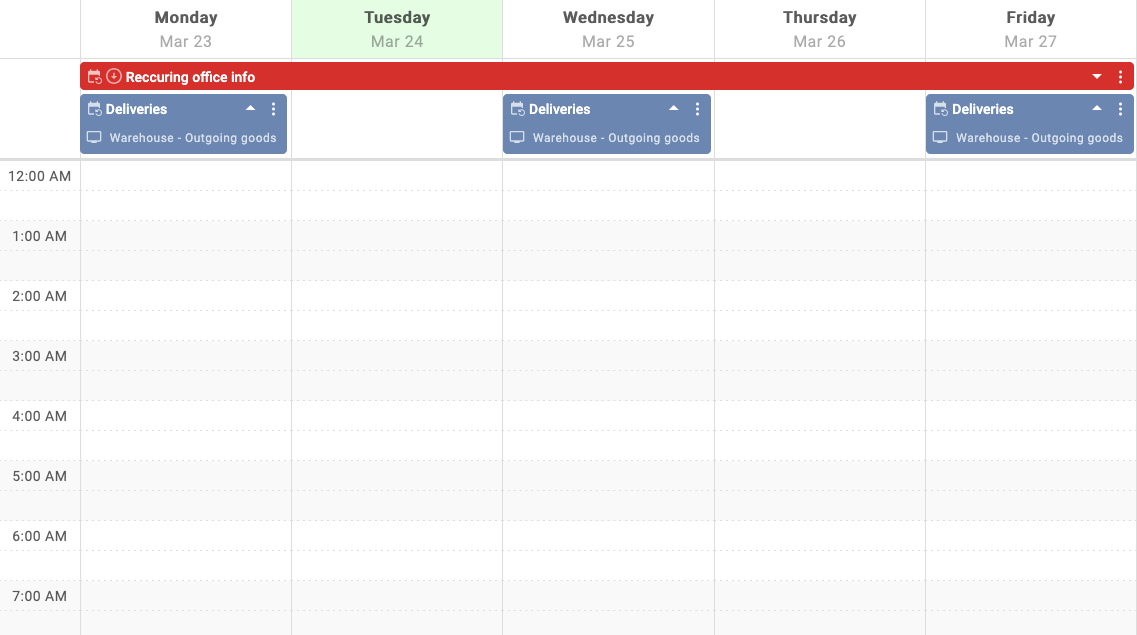
We've updated how all-day bookings are displayed and introduced a explicit all day booking option to provide a clearer and more consistent calendar overview.
- Bookings marked as "All day" appear in the dedicated "All day" section at the top of the calendar and play for the full day.
- Booking blocks can be expanded to show screen selection
- Bookings that span a full day using from-to times (but are not set as "All day") will continue to appear as regular scheduled bookings.
- All day bookings treat screen active time like any other booking, so screens will turn on and of as usual.
These changes improve clarity when managing schedules and reduce ambiguity between all-day and timed bookings. The update is available immediately for users on EU an AU, with no additional configuration required beyond selecting the "All day" option when creating or editing bookings.